

Introduction retouch photos:
Retouching Pictures in the digital age, photography has evolved far beyond capturing a single moment. Modern photographers and editors now use powerful tools to refine, enhance, and perfect images — a process known as photo retouching. Retouching pictures involves adjusting and improving visual elements to make a photograph more appealing or realistic. From fashion magazines to wedding albums, social media posts to commercial advertisements, image retouching plays a vital role in shaping how we perceive visual content.
What Is Photo Retouching?
Photo retouching is the process of editing images to correct flaws, enhance colors, improve lighting, and achieve a specific look or mood. Unlike basic photo editing — which may include cropping, resizing, or adjusting brightness — retouching dives deeper. It focuses on fine-tuning details such as skin tone, blemishes, background distractions, or object removal.
The goal of Retouching Pictures can vary depending on context. For example:
- In portrait photography, it helps smooth skin, whiten teeth, and highlight features without losing natural texture.
- In product photography, it ensures the item looks flawless, accurately representing its color, texture, and form.
- In fashion and advertising, retouching often aims for perfection, creating aspirational images that align with brand identity.
-
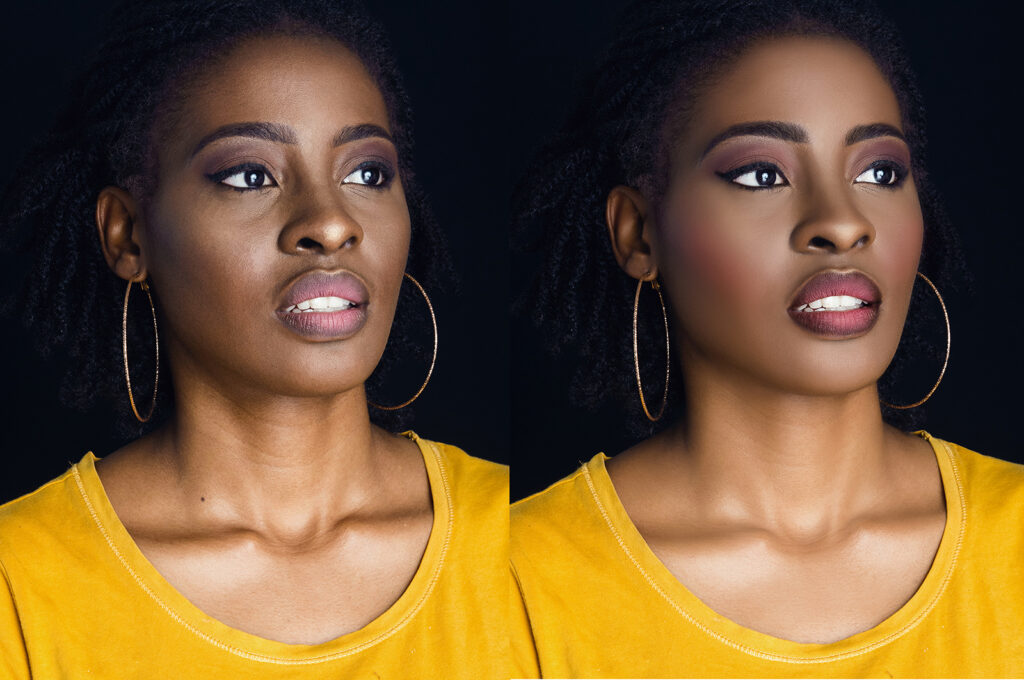
photography retouch
Common retouch photos Techniques:
Modern photo retouching uses a wide range of techniques — some subtle, others transformative. Here are the most common ones used by professionals:
-
Skin Smoothing and Blemish Removal:
This is one of the most popular forms of retouching, especially in portrait and fashion photography. Tools like the Healing Brush or Clone Stamp in Photoshop help remove pimples, scars, or wrinkles while maintaining realistic skin texture. Advanced editors also use frequency separation to separate texture from color for more natural results.
-
Color Correction and retouch photos
Colors can shift due to lighting conditions or camera settings. Retouching allows editors to adjust color balance, saturation, and tone curves to restore accuracy. A warm tone might be used for a romantic feel, while cooler tones give a calm, professional look.
-

Pictures quality enhancer
-
Teeth Whitening and Eye Enhancement
Small facial details make a big impact. Retouching can brighten eyes, sharpen their details, and subtly whiten teeth to make the subject appear healthier and more vibrant.
-
Background Cleaning or Replacement
Distracting elements in the background can ruin a good shot. Editors use masking, blurring, or complete background replacement to draw attention to the main subject. This technique is vital in e-commerce and product photography.
-
Object Removal and the Retouching Pictures:
Unwanted objects — such as trash cans, wires, or reflections — can easily be removed through tools like the Content-Aware Fill or Clone Stamp. The challenge lies in maintaining the image’s realism after the object is gone.
-
Sharpening and Noise Reduction:
Sharpness enhances image clarity, while noise reduction eliminates graininess. Retouchers balance these two elements carefully to avoid over-processing, which can make an image appear artificial.
-
Dodging and Burning:
A traditional darkroom technique now used digitally, dodging brightens parts of an image, and burning darkens them. Together, they add depth and dimension, guiding the viewer’s eye to key areas.
-
Composite Retouching:
In advanced cases, retouching may involve combining multiple images to create a single, seamless composition — for example, swapping skies, merging faces, or adding artistic effects.
Tools Used for Retouching:
The quality of retouching depends not only on the artist’s skill but also on the tools used. Here are some popular options:
- Adobe Photoshop: The industry standard for professional retouching, offering precision tools like layers, masks, filters, and brushes.
- Adobe Lightroom: Ideal for bulk photo correction and light retouching, often used by photographers for color grading and exposure adjustments.
- Capture One: Known for its color accuracy and tethering capabilities, widely used in fashion and commercial photography.
- GIMP: A free, open-source alternative that provides many Photoshop-like features for beginners or hobbyists.
- AI-based tools: Software like Luminar AI and Photoshop’s Neural Filters use artificial intelligence to automatically enhance portraits or landscapes, saving time without sacrificing quality.
The Role of Artificial Intelligence in Retouching Pictures:
AI has revolutionized the retouching process. Image retouching, which once took hours, can now be done in seconds with Photoshop.. AI can automatically identify and correct flaws, adjust lighting, or even change facial expressions. For example:
- Skin retouching algorithms detect blemishes and smooth skin naturally.
- Sky replacement tools identify the horizon and swap skies in a single click.
- Face recognition systems adjust lighting and color based on human features.
While AI makes retouching faster and more accessible, it also raises questions about authenticity. As algorithms become more advanced, distinguishing between real and manipulated images becomes increasingly difficult — a growing concern in journalism and social media.
Ethical Considerations and the retouch photos:
Retouching can enhance beauty, but it can also distort reality. Over-editing, especially in fashion and advertising, has been criticized for promoting unrealistic beauty standards. Excessive use of retouching tools — such as slimming body parts, altering facial features, or removing all skin texture — can mislead audiences and damage self-esteem.
To address these concerns, many brands and publications are adopting “no-retouch” or “minimal retouching” policies. For example, some magazines now disclose when an image has been digitally altered. Ethical retouching focuses on enhancing rather than altering — improving lighting, removing distractions, or correcting color without changing the subject’s true appearance.
The guiding principle for ethical retouching can be summed up as:
“Enhance reality, don’t replace it.”
Practical Tips for Effective retouch photos:
- Start with a high-quality image. The better the original photo, the less you’ll need to edit. Good lighting and sharp focus make retouching easier and more natural.
- Work non-destructively. Always use layers and masks so changes can be reversed or adjusted later.
- Zoom in and out frequently. Details matter, but so does the overall impression. Constantly check your work at different zoom levels.
- Maintain skin texture. Avoid over-smoothing — natural pores and fine lines give realism.
- Use subtlety. The best retouching is invisible; the image should look naturally beautiful, not heavily edited.
- Calibrate your monitor. Accurate color display ensures your retouching looks consistent across devices and prints.
- Stay updated. Retouching trends and tools evolve quickly. Continuous learning helps maintain a professional edge.
Conclusion retouch photos:
Photo retouching is both an art and a science — a balance between creativity and technical precision. It allows photographers and editors to elevate their work, telling more powerful visual stories. However, with great power comes responsibility. In a world flooded with digitally altered images, authenticity and transparency matter more than ever.
When used thoughtfully, retouching doesn’t hide reality — it reveals the best version of it. Whether you’re a professional editor or a hobbyist photographer, mastering retouching means understanding not just how to enhance an image, but why you choose to.
In the end, the true beauty of photo retouching lies not in perfection, but in its ability to bring out the essence of the moment — one subtle, intentional edit at a time.
Would you like me to tailor this article for Retouching Pictures .











Leave A Comment